How we built a traceable and auditable path from GitHub to Oracle Cloud, automated routine deployments, required human approval for critical infrastructure changes, and learned from the failures along the way.
The Objective
Most infra deployment tooling looks the same from a distance: code goes in, a server comes out the other side configured correctly. The interesting part — the part worth documenting — is everything in between: how you know what got deployed, how a human gets a chance to say “wait, not yet, was it being reviewed and discussed based on blast radius.
This post covers the architecture of that pipeline and the practical failures we encountered while implementing it.
Part 1 — The architecture
The core problem: auditability
Before any of the mechanics, the design question was: when something changes on a production host, can we answer “what changed, who approved it, and can we point at the exact artifact that produced it” — after the fact, without relying on anyone’s memory?
That single requirement drives most of the design decisions below. Concretely, it means:
- Every deployment references a specific, versioned artifact — not “whatever’s on the branch right now.”
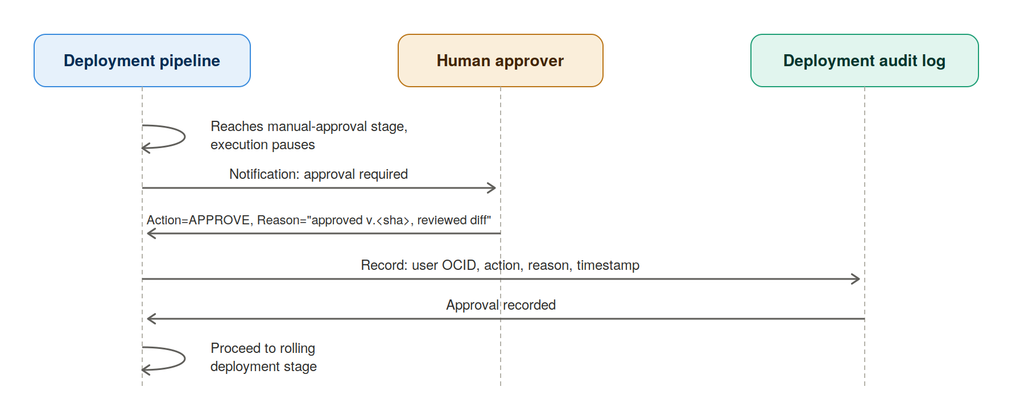
- State-changing stages require a human approval event, recorded with a reason and a user identity, before they run.
- Every step’s output should end up logged centrally, tied to a deployment ID, not just scrolled past in a terminal and lost — this depends on OCI DevOps Logging being turned on for the project, which is worth checking rather than assuming.
High-level flow
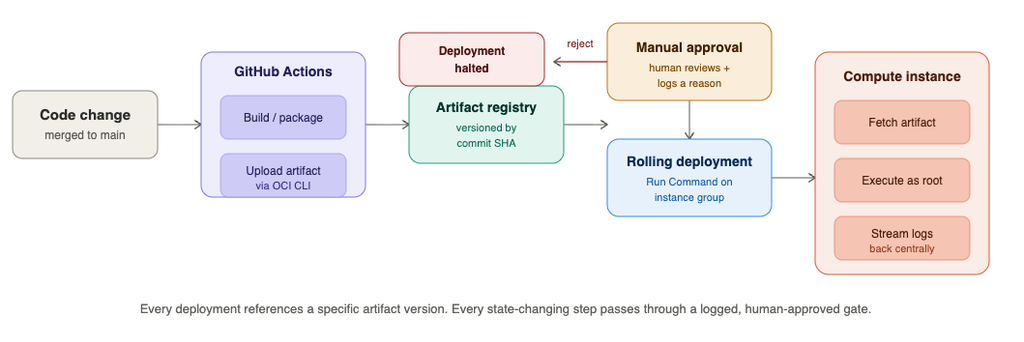
The important property here: the artifact registry sits between CI and deployment. GitHub Actions never deploys directly to a host. It builds something, versions it, and puts it in a shelf. The deployment pipeline is a separate process that later decides to pick something off that shelf and roll it out. This separation is what makes “what’s running in prod” a question you can answer by looking at pipeline history, rather than by SSHing in and hoping the last person left good notes.
How GitHub Actions connects to OCI Artifact Registry
This is the part that trips people up first, because it looks like it should be “just upload a file somewhere,” and the actual mechanism has a couple of layers worth understanding.
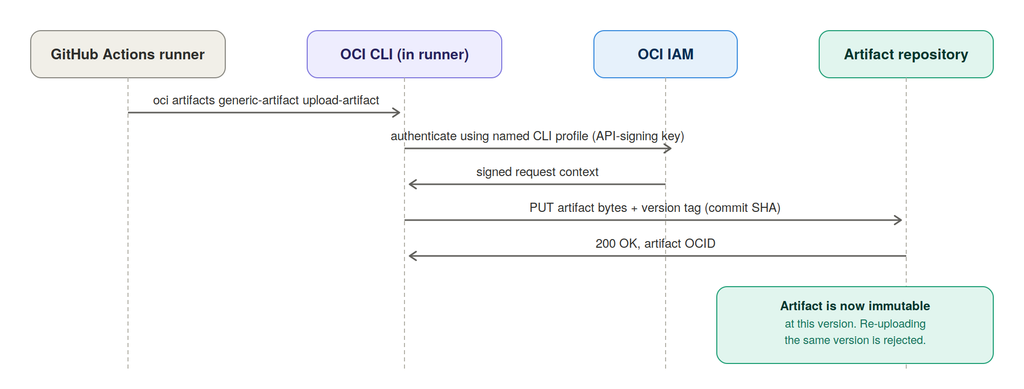
The artifact is stored as a generic artifact, tagged with a version string — in our case, the Git commit SHA. That single decision (version = commit SHA, not “latest” or a manually bumped number) is what lets you later look at a failed deployment log and trace it back to an exact commit with git show <sha>, no guessing.
Authentication
GitHub Actions authenticates to OCI using protected secrets containing an OCI API key configuration. The OCI CLI signs requests with the private key and uploads artifacts using the automation user’s IAM permissions.
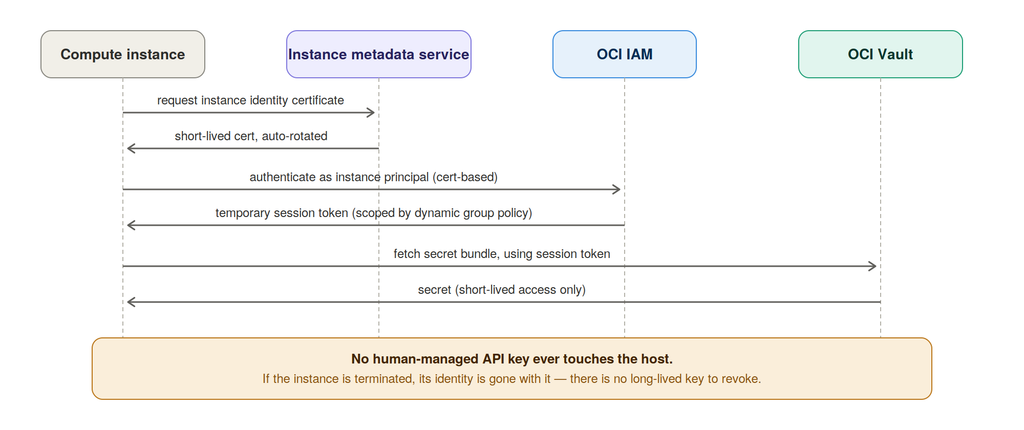
The compute instance uses OCI Instance Principal authentication. Its dynamic group and IAM policies allow it to access only the required Vault secret and OCI resources. No API key is stored on the VM.
OIDC federation for GitHub Actions is a possible future improvement but is not currently configured.
Deployment Paths: manual-gated vs. triggered
The pipeline supports two entry points, and the choice between them is really a choice about blast radius and reversibility, not about convenience.
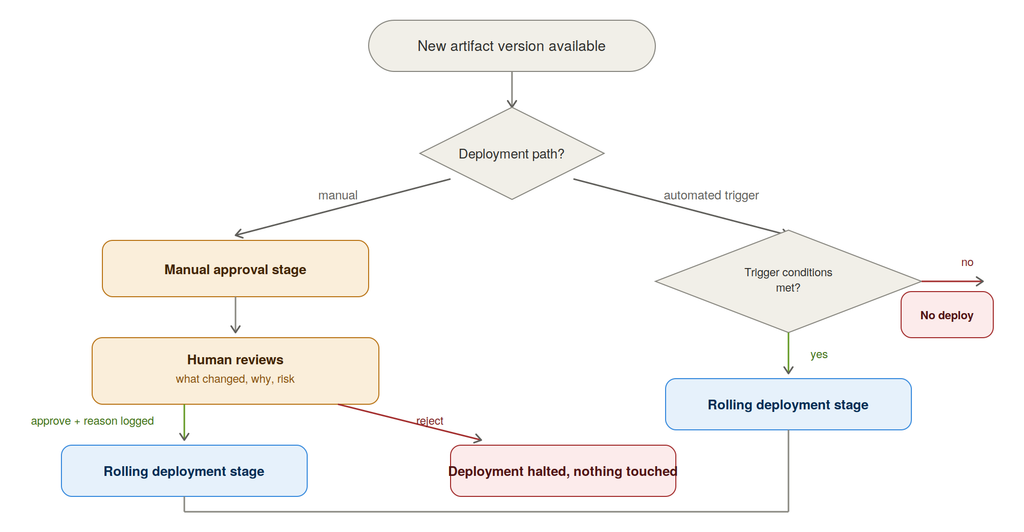
We use the manual-gated path for the production compute-host bootstrap and runtime stages — these touch firewall rules, disk mounts, and database runtime config on a stateful host, where a bad rollout isn’t trivially reversible. Automated triggers are reserved for lower-risk, easily-rolled-back changes.
The approval isn’t just a button click — it requires a reason string, and that reason, along with the approver’s identity and a timestamp, becomes part of the deployment history. It can also be correlated against OCI Audit events, subject to whatever retention policy you’ve actually configured.
Progressive rollout
With a 100% rollout, every target instance can be updated together. A 50% rollout updates no more than half of the group at a time before continuing with the remaining instances.
Combined with delays between batches and failure thresholds, this provides a safer progression toward full deployment. The benefit becomes more important as the fleet grows: a failed release can be detected before every instance is affected, reducing both downtime and recovery scope. This extremely useful we have multiple instances in cluster and if we have multi region cluster.
Multi-Region Blue–Green Deployment
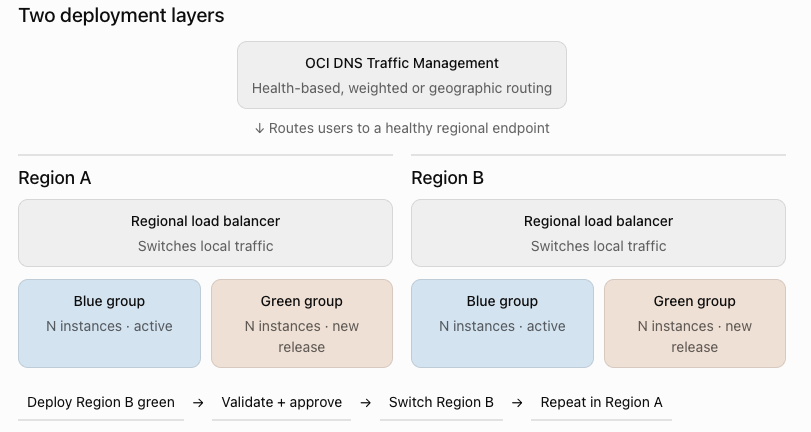
For OCI, the clean design is: blue/green within each region, then global routing across regions. Do not use Region A as blue and Region B as green—that couples application deployment with disaster recovery.
How this fits our current scale
The infrastructure currently runs on a small number of instances, so a full blue/green setup would duplicate infrastructure without providing enough immediate value.
The useful part today is that deployments already run through OCI DevOps with versioned artifacts, approval stages and configurable rollout policies. As the instance group grows, we can move to percentage-based batches and eventually introduce separate blue and green groups behind a load balancer. That gives us a practical path to safer releases and faster rollback without over-engineering the platform before the scale justifies it.
Part 2 — Lessons from actually building this
The architecture defined how the deployment should work. Implementation exposed assumptions that architecture diagrams rarely show—particularly how identity, shell execution and process supervision change when commands move from an interactive session to automation.
Lesson1: The Same Command Can Run Under a Different Identity
A command worked over SSH but failed in the OCI pipeline with sudo: a password is required. The difference was not the command—it was the path used to execute it. SSH ran under an administrative account, while OCI used its restricted ocarun service account. The solution was to configure scoped permissions for ocarun and validate the operation through the pipeline itself.
The broader lesson is simple: test automation through its actual execution path. A successful manual command proves the command works; it does not prove the deployment system can execute it securely.
Lesson 2: Supervise the Container, Not Just Its Startup
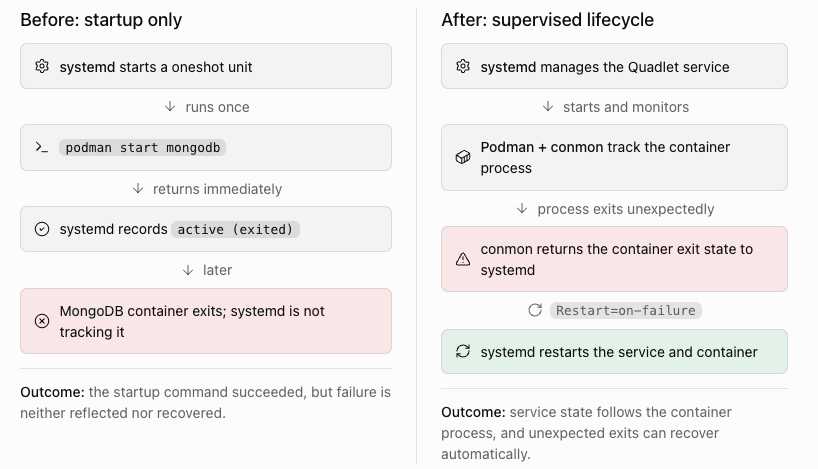
During review, systemctl status showed active (exited) even when the MongoDB container was no longer running. The systemd unit executed podman start, but that command returned immediately after starting the container. With Type=oneshot and RemainAfterExit=yes, systemd remembered the startup as successful without continuing to monitor the container.
The planned correction is to replace the wrapper service with a Podman Quadlet unit. This allows systemd to track the container process through conmon and apply Restart=on-failure when it exits unexpectedly.
The intended outcome is straightforward: service status should reflect the actual container state, and an unexpected container failure should trigger automatic recovery. The final validation will be to terminate MongoDB deliberately and confirm that systemd restarts it without affecting the persisted data.
[Unit]
Description=ModusFocus MongoDB Podman container
Wants=network-online.target
After=network-online.target
RequiresMountsFor=/mnt/mongodb-xxx-xx

[Container]
ContainerName=mongodb
Image=docker.io/library/mongo:7.0.x
EnvironmentFile=/etc/xx/mongodb-xx/mongodb.env
Volume=/mnt/mongodb-xxx/mongodb-xx:/data/db:Z
PublishPort=__PRIVATE_IP__:27017:27017
HealthCmd=bash -c "</dev/tcp/127.0.0.1/27017"
HealthInterval=30s
HealthRetries=5

[Service]
Restart=on-failure
TimeoutStartSec=180
TimeoutStopSec=60

[Install]
WantedBy=multi-user.target
Key Takeaways
- Define clear ownership: Terraform manages OCI networking, cloud-init prepares the host, and the deployment pipeline installs and configures the workload.
- Test the real automation path: A command working over SSH does not validate the identity, permissions or environment used by the pipeline.
- Keep critical changes auditable: Use versioned artifacts and approval gates for changes with a high blast radius. Treat SSH as break-glass access.
- Verify outcomes, not commands: A successful startup command does not prove the service remains healthy or can recover from failure.
Closing Thoughts
Building this pipeline reinforced that the difficult part is not connecting the tools—it is deciding which layer owns each responsibility. Terraform for cloud infrastructure, cloud-init for the host baseline, the deployment pipeline for workload changes, and systemd for runtime supervision. Most of the failures appeared where those boundaries were unclear.
These are not universally “best” choices. They are the choices that fit our current risks: automate routine and reversible changes, require approval where the blast radius is higher, keep SSH as break-glass access, and make every deployment traceable. As the system grows, we expect to revisit the implementation—but the questions remain the same: who owns the change, which identity performs it, what evidence does it leave, and what happens when it fails?