An MVP recovery path for a self-hosted MongoDB container on Oracle Cloud—not high availability, point-in-time recovery, or a replacement for a managed database platform.
Background
ModusFocus (our productivity app) runs on MongoDB in a Docker container on Oracle Cloud. This post explains how I designed a practical disaster-recovery path around MongoDB logical backups, OCI Vault, Object Storage, scheduled verification, guarded retention, and a human-approved restore process.
It is intentionally an MVP. It is not a high-availability MongoDB cluster or point-in-time recovery system. But it does solves an important early-stage production problem: if the database environment or data becomes unusable, there is a deliberate and repeatable way to recover..
Understanding the problem: persistent data is not the same as recoverable data
Docker made it easy to run MongoDB, and persistent storage made it possible for the data to survive a container restart or recreation. But that is not the same thing as disaster recovery.
Persistent storage does not give me an independent copy if there is a bad migration, logical corruption, accidental deletion, host failure, or a storage-level problem. I needed a backup outside the running database environment and a process for bringing that backup back safely.. Using dedicated Mongo Cluster such Mongo Atlas or similar does provide retention , backups, point in time restore etc out of the box but comes with cost i.e price
Why we chose MongoDB logical backups and OCI Object Storage
I chose mongodump because it creates a portable logical MongoDB archive. That archive can be restored into a new or recovered MongoDB environment using mongorestore.
I chose OCI Object Storage because it keeps the backup separate from the database instance and the entire App runs on OCI. It is durable, designed for object-based archives, and works well with OCI identity controls. The important design choice was not only “where do I store files?” but “where can I keep a recovery copy that does not disappear with the server?”
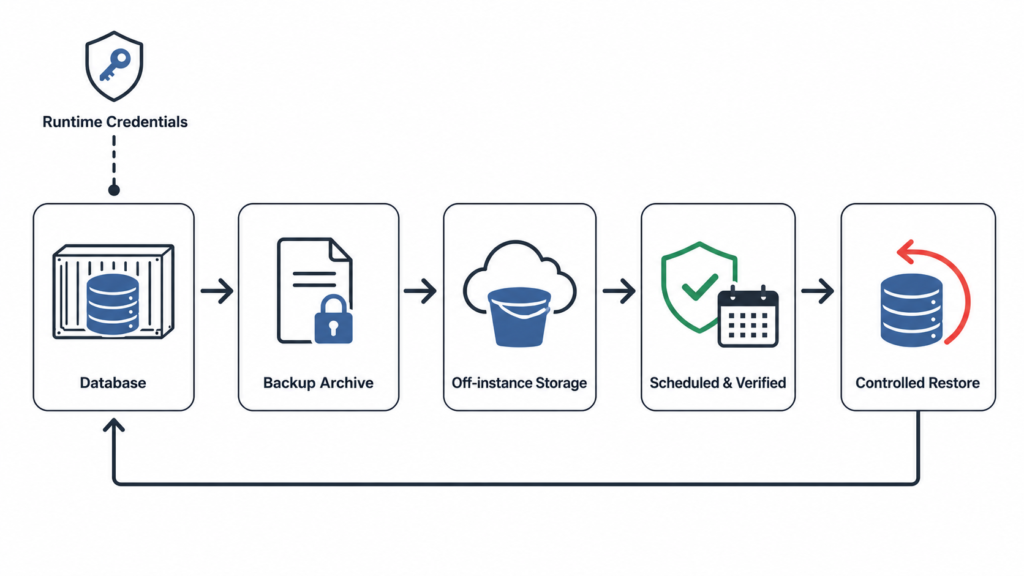
Designing Mongo Backup scripts
I did not want a script that simply ran a dump command and assumed everything was fine. I wanted the script to behave like a small reliability component, that can track status of last successful dump, store local copy of files metadata and has in built in fail-safe mechanism for unforeseen circumstances with reports and alerts.
Working principle
- Confirm the MongoDB container is running.
- Prevent overlapping backup jobs with a lock.
- Retrieve database credentials from OCI Vault at runtime.
- Create a compressed MongoDB archive in protected temporary storage.
- Reject an empty archive.
- Upload a uniquely named archive to OCI Object Storage.
- Verify that the remote object exists and matches the local archive size.
- Delete the temporary archive only after successful verification.
- Retain the local archive when a failure needs investigation.
# Simplified illustrative flow
create_backup_archive

test -s "$archive_file" || exit 1

upload_without_overwrite "$archive_file" "$object_key"

verify_remote_object "$object_key" "$archive_file"

remove_local_archive_only_after_verification
Handling Credentials
The backup script needs MongoDB credentials, but I did not want passwords in source code, deployment scripts, infrastructure state, or logs.
Instead, the database instance uses OCI instance-principal authentication to retrieve the secret from OCI Vault only when the backup runs. The instance receives permission to read only the secret and interact only with the backup storage it needs.
This separated identity from credentials: the server proves who it is via OCI Policies, OCI authorizes it, and the script receives the secret only at runtime.
Retention: why deletion needs its own safety checks
Retention sounds simple: delete old backups. In practice, this is one of the easiest places to make a recovery system less safe.
I designed retention to fail closed. Before deleting an older archive, it checks that recent backups exist and are valid. If expected backup coverage is missing, the retention job reports an error and deletes nothing.
The principle is simple: never save storage costs by accidentally deleting the only usable recovery copy.
Restore: why a human must remain in the loop
Incident identified
→ operator selects a recovery point
→ application enters maintenance mode / writers are stopped
→ current state is backed up if possible
→ operator explicitly approves restore
→ archive is downloaded and verified
→ MongoDB is restored
→ database and application data are validated
→ operator approves reopening the application
Turning scripts into an internal recovery tool
The next step is to turn recovery automation from a collection of scripts into an internal platform capability. Source-controlled scripts can be validated in OCI Build, packaged as an approved artifact, and deployed through an OCI deployment pipeline. The running database environment retrieves credentials only at runtime, while backup, retention, monitoring, and recovery remain separate responsibilities.
Most importantly, destructive recovery retains a human approval step rather than becoming an automatic pipeline action.
Git repository
→ OCI build pipeline validates scripts and unit files
→ approved build artifact is produced
→ OCI deployment pipeline deploys the approved artifact
→ database instance runs scheduled backup and retention jobs
→ monitoring reports backup health
→ recovery workflow requires human approval
The Design and Architecture
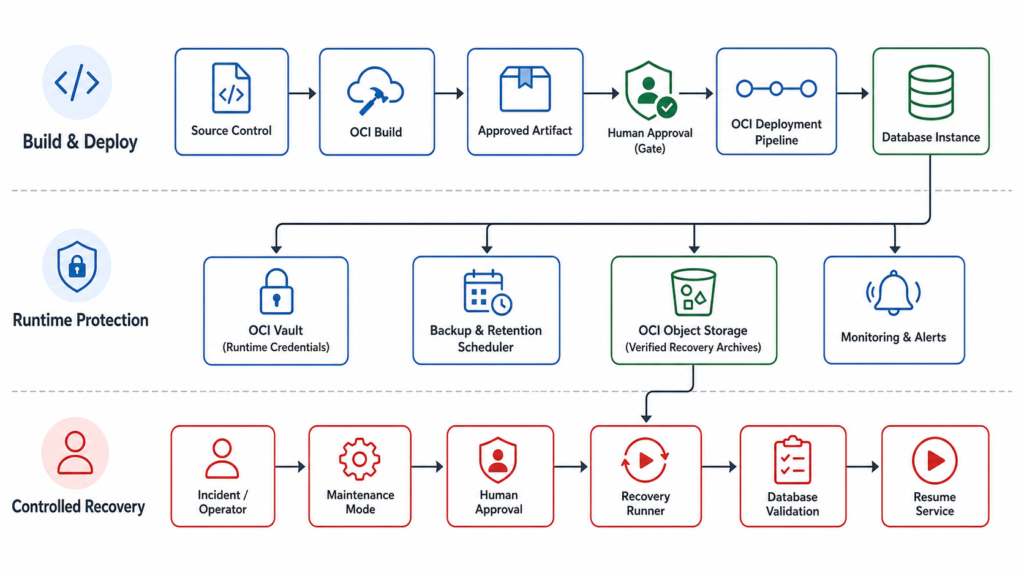
Three Core Responsibilities
Build & Deploy — source control → OCI Build → approved artifact → human approval gate → OCI deployment pipeline → database instance.
Runtime Protection — OCI Vault provides runtime credentials; scheduler runs backup/retention; OCI Object Storage holds verified archives; monitoring reports health.
Controlled Recovery — an operator initiates an incident workflow, enables maintenance mode, obtains human approval, runs recovery, validates the database, then resumes service.
Closing Note…
The biggest lesson was that disaster recovery is not one command, one bucket, or one scheduled job. It is a chain of decisions: where recovery data lives, how credentials are handled, how success is verified, when deletion is safe, and who is allowed to restore. The scripts are only one part of that system.